Less data admin. More time for your teams.
Bring event, partner and business-system exports into HubSpot without the usual spreadsheet juggling. furball Data Ingestion Studio gives sales, marketing and RevOps a guided process, with Cat Media on hand to manage it end to end.
Product tour coming soon
Why the Studio
Reliable attribution starts at import
Every duplicate has an origin story. In our experience, a spreadsheet is often involved. After five years and thousands of imports, we built the Studio to make clean ingestion the foundation of reliable marketing and sales attribution.
- Bring data together
- Give event, partner and business-system exports one consistent route into HubSpot. Keep valuable activity moving into your CRM, without a different process for every source.
- Free up your teams
- Let sales, marketing and RevOps focus on the next opportunity, not spreadsheet clean-up. Run a guided process in-house, or let Cat Media manage your imports end to end.
- Trust what goes in
- Match, standardise and review data before it reaches your CRM. Clear controls help protect record quality and give reporting, follow-up and AI a stronger foundation.
- Connect at your pace
- Get useful data flowing before investing in a full integration. Use real imports to understand how records connect and prove your mappings before committing to an API build.
How it works
From spreadsheet to HubSpot in six steps
Every import follows the same guided flow, so nothing reaches your CRM until it has been cleaned, mapped and reviewed.
- 1
Upload
Any CSV or Excel file. Pick the worksheet and header row.
- 2
Prepare
Profile and clean every column. Your file never changes.
- 3
Map
Split one table into companies, contacts and notes.
- 4
Details
Set update rules, standardise values, add notes and events.
- 5
Review
Match existing records and fix issues row by row.
- 6
Deliver
Download import files or import straight into HubSpot.
Prepare & clean
Clean data before it reaches your CRM
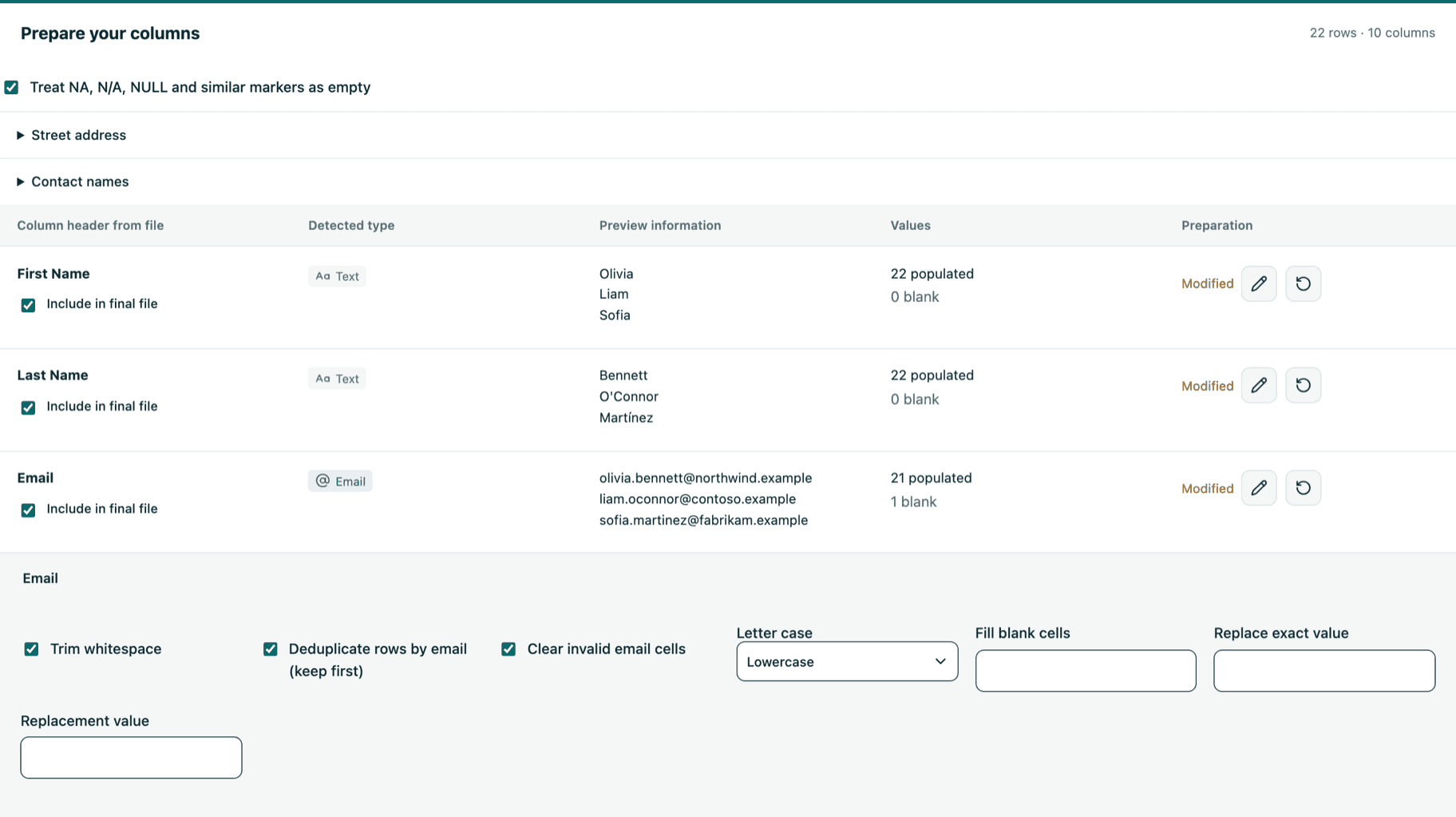
Upload CSV or Excel files, including multi-sheet workbooks with rows above the header, into a fast spreadsheet view. furball profiles every column, showing detected types, sample values and blanks, so you can clean each one without changing your original file.
- Flexible uploads.
- Pick the worksheet and header row, skip or include specific rows, and start after the last row you already processed.
- Column clean-ups.
- Trim, replace and change case, fill blanks, normalise NA and NULL values, clear invalid emails and remove duplicate emails.
- Sensible defaults.
- Empty columns are skipped automatically, address lines can be combined into a street address and full names can be split.
Standardisation
Dates, locations and phone numbers, standardised
Consistent values keep HubSpot imports, reports and workflows reliable. furball converts common formats and flags anything it can't resolve for review.
- Dates and times.
- Convert dates using IANA time zones or Zoom time zone abbreviations, with daylight saving checks.
- Countries and regions.
- Output names or ISO codes, with spelling corrections, fuzzy region matching and review warnings for ambiguous values.
- Phone numbers.
- Format numbers in E.164 and add companion columns showing whether each number is valid and its region.
Property mapping
Map to your portal's real properties
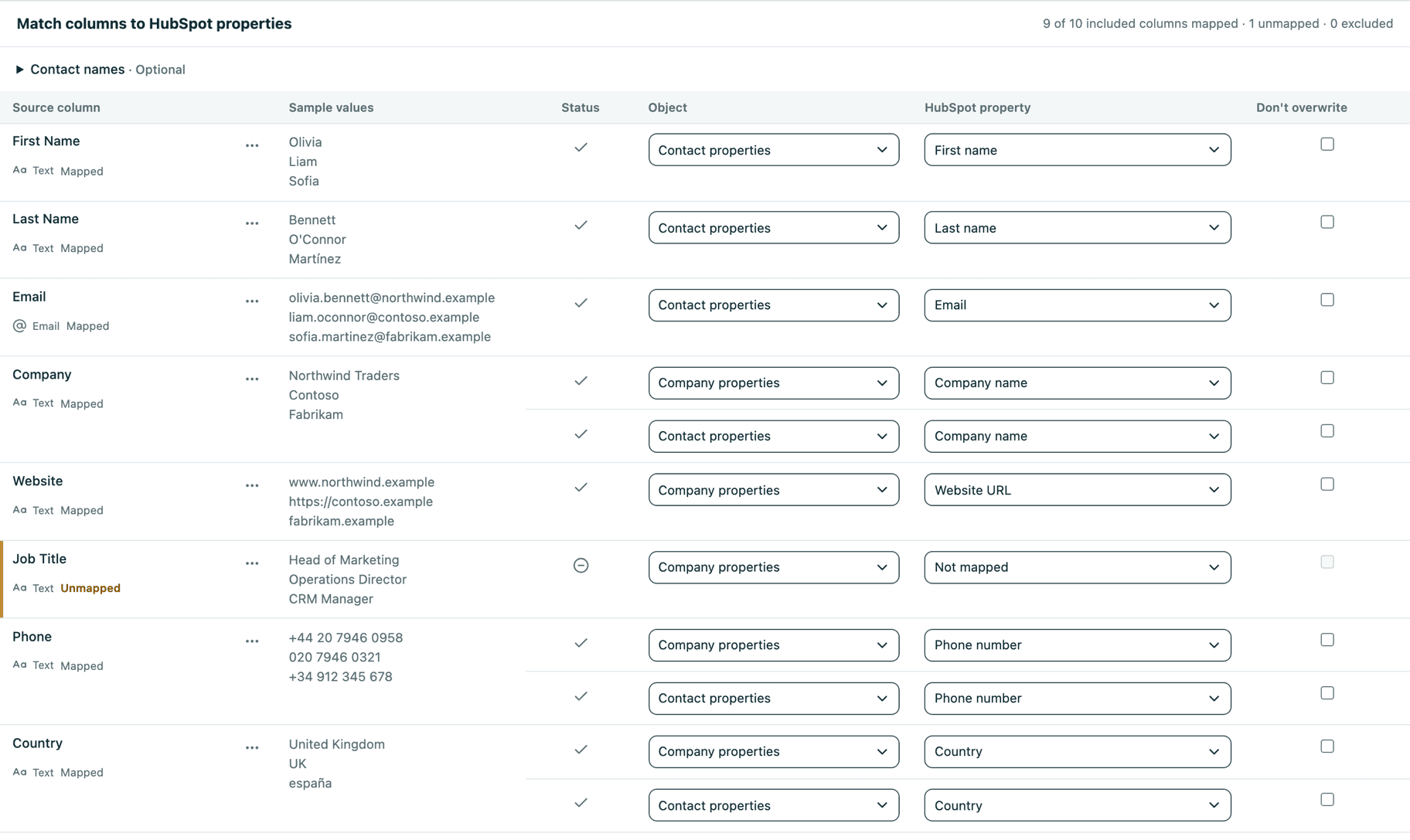
One table can hold companies, contacts and notes. furball separates them and maps each column across objects and custom properties. A company-name column can populate both the company and its contacts, without duplicating it in your file.
- AI-assisted suggestions.
- Optional header suggestions use only column names and allowed property names, never cell values.
- Dropdown values and new properties.
- Review values against dropdown options, replace them or add new options, and create missing properties after confirmation.
- Overwrite protection.
- Mark a property as Don't overwrite to keep the values already stored in HubSpot.
Notes & events
Bring your campaign context with you
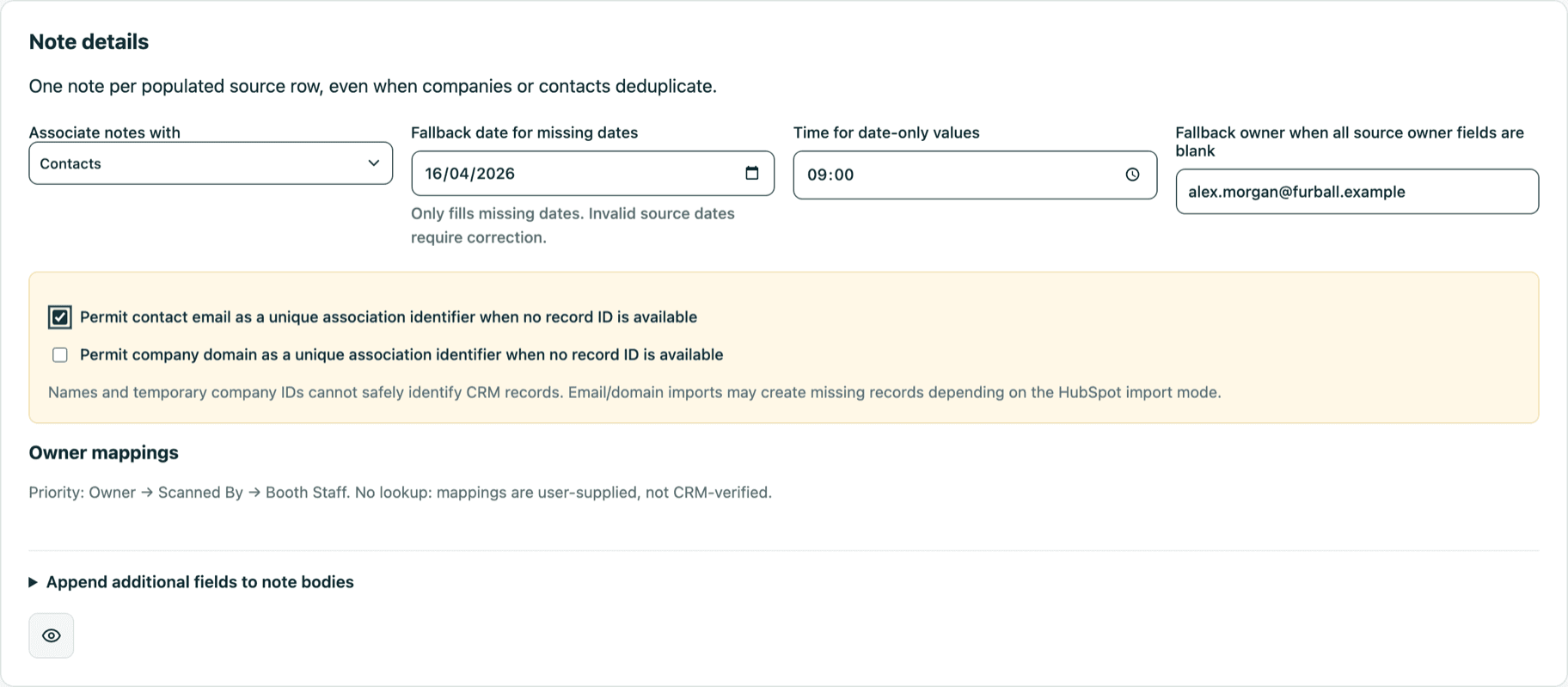
From webinar registrations and conference leads to trade-press conversions and partner campaigns, bring the context with your records. Give sales a clearer starting point for follow-up and marketing a stronger basis for attribution.
- Notes from your columns.
- Build notes from selected columns, with note dates, HubSpot owners and associations to companies and contacts.
- Marketing event attendance.
- Record Registered at and Attended at times for each contact, with fallbacks when a time is missing.
- Contact custom events.
- Prepare custom event occurrences for each contact as a file, ready to import into your custom event. Creating events and updating them automatically is coming soon.
Matching & review
Match and review every row before import
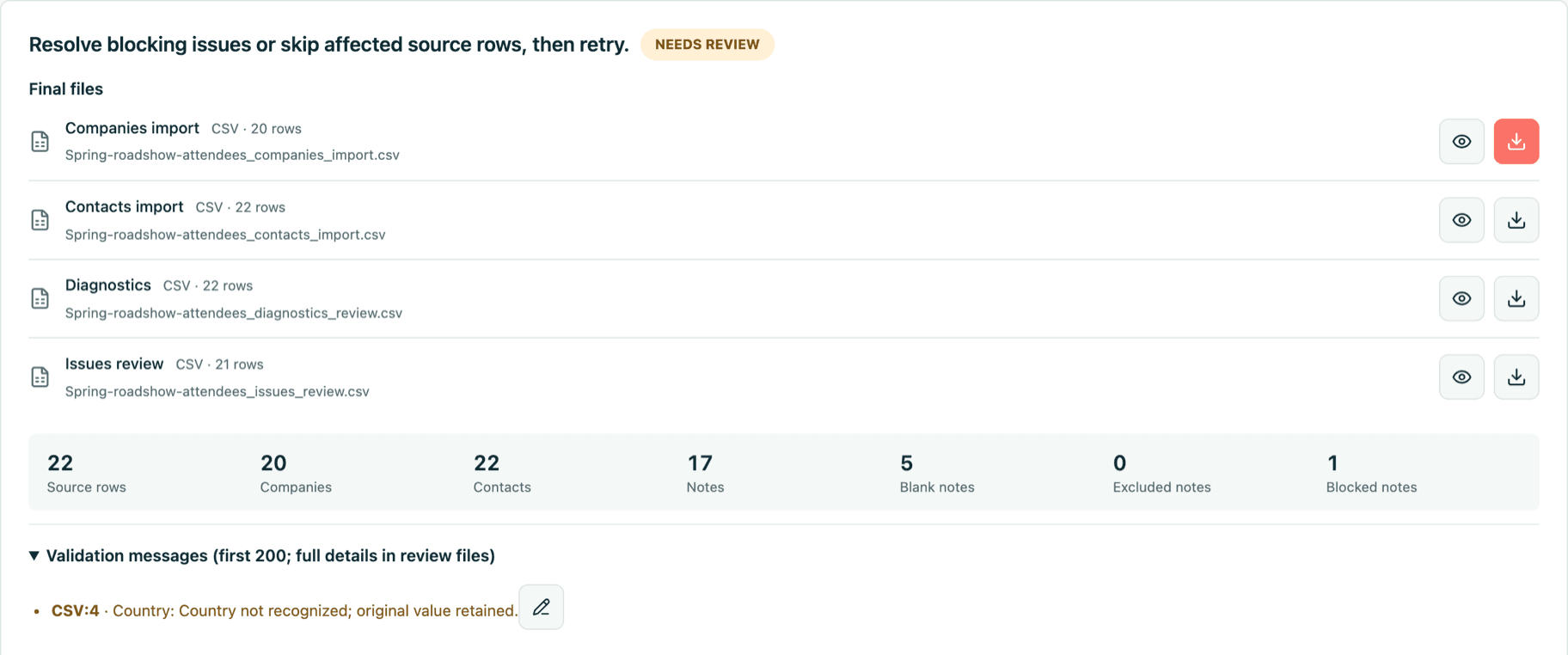
See exactly what will change. furball matches rows to existing HubSpot records and validates every row, so problems are fixed before they reach your CRM.
- Record matching.
- Find existing companies by name, country and your portal's properties, even without a domain, with optional AI review. Contacts match on record ID or any of their email addresses.
- Row-level decisions.
- Warnings and errors link to the affected rows, where you can accept, replace or clear a value. Only changed rows are reprocessed.
- HubSpot record previews.
- Record IDs lead each file and open a preview of the matching HubSpot record without leaving furball.
Files or automated import
Download files or import straight into HubSpot
Choose the delivery that suits your team: import-ready files with instructions for HubSpot's import tool, or automated ingestion after explicit confirmation.
- Import-ready files.
- Download separate company, contact and note files, with clear step-by-step instructions to help your team complete each HubSpot import with confidence.
- Automated ingestion.
- Import companies, contacts and notes into HubSpot, associate by record ID rather than email domain, and avoid duplicate loops with Salesforce.
- Segments and events.
- Turn each import into useful segments, including new contacts and event attendance, so sales and marketing can follow up with the right context.
- Built-in safeguards.
- Checkpoint each run at every step, reconcile uncertain outcomes rather than replaying them, and stop processing when access changes or is revoked.
Roles & approvals
Governance for every portal
Give each person the access they need. Restricted users can prepare imports, while their downloads, HubSpot imports or both wait for an approver.
- Approvals.
- An approval covers the exact prepared files and import options. If anything changes, a new approval is required.
- Enforced defaults.
- Admins can lock default settings, from preparation to import options, for everyone who isn't an admin.
- General defaults.
- Super admins set defaults for new portals and can apply them to selected portals after reviewing every change.
| Role | Prepare files | Download files | Import into HubSpot | Approve requests | Portal settings |
|---|---|---|---|---|---|
| Super admin | Yes | Yes | Yes | Yes | Change, plus general defaults and connections |
| Admin | Yes | Yes | Yes | Yes | Change, including enforcement |
| Approver | Yes | Yes | Yes | Yes | View |
| Editor | Yes | Yes | Yes | No | View |
| Restricted | Yes | After approval | After approval | No | View |
For each restricted user, you choose whether downloads, HubSpot imports or both need approval. Restricted users can't create HubSpot properties or dropdown options.
Multi-portal workspace
One workspace for all your HubSpot portals
Switch between connected portals, keep settings for each one and give your team shared access to its imports.
- Portal connections.
- Connect portals with HubSpot OAuth, give them a name and find any portal by name, domain or ID.
- Per-portal settings.
- Save defaults for preparation, dates and times, locations, phone numbers, notes, outputs, matching and imports.
- Shared import history.
- Teammates with access to a portal share its imports, with share links and editing locks that prevent conflicting changes.
- Secure sign-in, anywhere.
- Sign in with Microsoft Entra ID on desktop, or install furball as an app on your phone.
Safeguards
Confidence before anything changes in HubSpot
furball is built so your team can see and check every change before it reaches your CRM.
- Nothing is written without confirmation
- Preparing files never writes to HubSpot. Automated imports start only after you confirm the destination portal and record counts.
- Your original file stays untouched
- Uploads are kept exactly as they are. Clean-ups, row decisions and settings are saved alongside each import.
- AI is optional and minimal
- AI assistance is off unless you turn it on. Header suggestions use column names only, and company review sends only the properties you choose.
- Access is checked on the server
- Microsoft Entra ID sign-in, per-portal access by email and roles that are enforced by the server, not just hidden in the interface.
Documentation
Learn the Studio, step by step
Practical guides take your team through every stage, from preparing a file to reviewing results in HubSpot. Start with the basics, or go deeper into matching, standardisation and automated imports.
- Get startedFollow a first import from start to finish, with links to a detailed guide for every step.Read the guide
- How it worksUnderstand the ideas behind every import, so each step makes sense and results are predictable.Read the guide
- Best practicesUse a practical checklist to plan, prepare and review imports that improve your CRM data.Read the guide
- FAQsFind quick answers about files, record matching, AI and who can work with each portal.Read the guide
On the roadmap
From guided imports to data orchestration
Today, the Studio starts with CSV and Excel files. API inputs and scheduled jobs are on the roadmap, alongside templates and broader object support, building towards a full data orchestration platform.
- API data sources
- Bring data in directly from other systems' APIs, with the same preparation, matching and validation as files.
- Scheduled imports
- Run ingestion jobs on a schedule, making recurring data work a governed process rather than another manual upload.
- Automated events
- Create custom events and keep their occurrences up to date automatically, instead of preparing them as files.
- More object types
- Import every object HubSpot's own import tool supports, from deals and tickets to your custom objects.
- Import templates
- furball recognises the type of file you upload and applies the right settings, or suggests them.
- Delta imports
- Import only the rows added since your last run, ideal for on-demand webinar attendance files that keep growing.
The furball platform
Keep your data clean after it's imported
Good data operations do not stop at ingestion. Audit, deduplicate and standardise what's already in HubSpot, with Cat Media's expertise to connect the wider picture.
 AuditCRM AuditSee duplicates, missing data, unworked contacts and user adoption across your HubSpot portal in one audit.Data quality, governance and adoptionfurball Insights on your sales pipelineLive share links and PDF reportsLearn more
 DeduplicateMatching & DeduplicationFind duplicate contacts and companies, review every group with a confidence score and merge with control.Confidence-scored duplicate groupsA fast review queueConfigurable matching and auto mergeLearn more
 StandardiseStandardisation & FormattingKeep phone numbers, locations, job titles, industries and names consistent across your HubSpot portal.Phone, name and location formattingJob titles, seniority and industriesGeographic inferenceLearn more
Get started
Find an easier way to bring your data together
Tell us where your data comes from and what your team needs next. We'll help you choose a streamlined in-house workflow, a fully managed import service, or the first steps towards an integration.
Already have access? Sign in to the Studio